ERP vs Excel: When Should a Growing Saudi Business Switch?
11 min read
On this page
- ERP vs Excel: What's the Difference?
- Why Most Saudi SMEs Start on Excel (And Why That's Fine)
- 7 Signs Your Business Has Outgrown Excel
- 1. Month-end close takes more than 3 to 5 days
- 2. Stock numbers never match the warehouse
- 3. Several people edit the same file
- 4. You run more than one branch or warehouse
- 5. VAT returns need hours of reconciliation
- 6. Only one person "understands the sheet"
- 7. Management can't get a live report
- Quick Self-Check: Should You Switch Now?
- When Excel Is Still Enough
- What Actually Changes When You Move to ERP
- How to Move From Excel to ERP: A 5-Step Roadmap for Saudi SMEs
- What About Cost?
- Frequently Asked Questions
- Can Excel be used as an ERP?
- When should a business switch from Excel to ERP?
- Is ERP worth it for a small business in Saudi Arabia?
- How long does it take to move from Excel to ERP?
- Can we import our Excel data into an ERP system?
- Will we still use Excel after implementing ERP?
- Do ERP systems support Arabic?
- The Bottom Line
It's the last week of the month at a trading company in Dammam. The accountant is waiting on sales figures. The warehouse team is updating stock_FINAL_v4.xlsx. Someone in the Riyadh branch saved over yesterday's version. Nobody is sure which number is right.
If that sounds familiar, you're in the right place.
Here's the short answer: a Saudi business should switch from Excel to ERP when spreadsheets start costing more time than they save. That usually happens once you run more than one branch or warehouse, have several people editing the same files, or need more than three to five days to close the month.
Excel isn't the problem. Outgrowing it without noticing is. This guide shows you how to spot that point, how ERP and Excel actually compare, and how Saudi SMEs can make the move without disrupting daily work.
ERP vs Excel: What's the Difference?
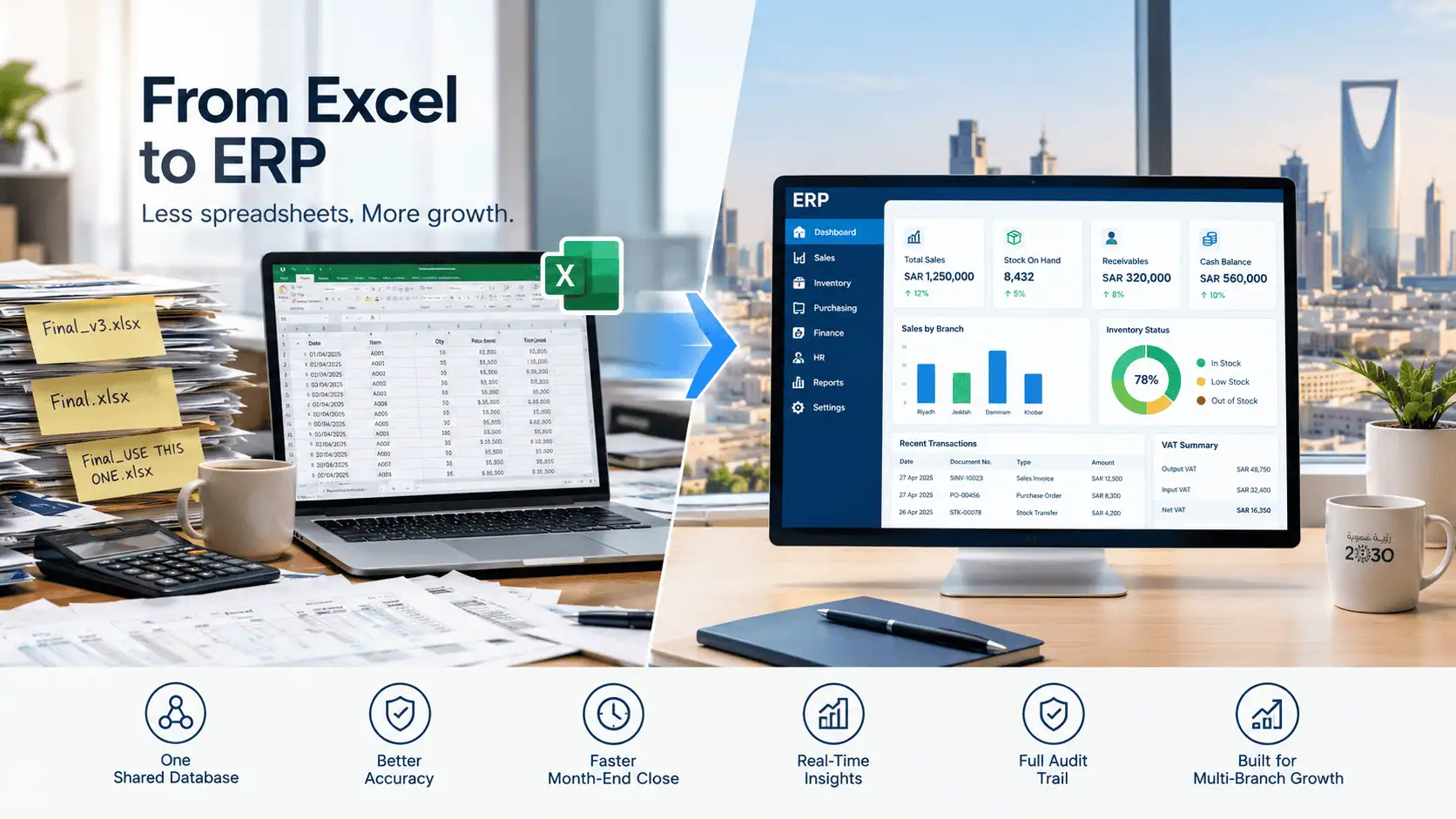
Excel is a spreadsheet tool where each file stores data separately and people update it by hand. An ERP (Enterprise Resource Planning) system is one shared database that connects sales, inventory, purchasing, finance and HR, so every department works from the same live numbers. Excel records data. ERP runs processes.
That difference sounds small on paper. In practice, it decides whether your sales manager in Jeddah and your accountant in Riyadh see the same stock figure or two different ones.
|
Factor |
Excel |
ERP system |
|---|---|---|
|
Where data lives |
Separate files on laptops, email and shared drives |
One central database |
|
Multi-user editing |
Risky; files get overwritten or duplicated |
Many users at once, each with role-based access |
|
Error control |
Manual; one wrong formula spreads silently |
Built-in validation and approval steps |
|
Inventory accuracy |
Updated by hand, often days late |
Updates automatically with every sale and purchase |
|
VAT reporting |
Pulled together manually from several sheets |
Generated from posted transactions |
|
Arabic and English reports |
Built by hand, one sheet at a time |
Bilingual reports and documents built in (most KSA ERPs) |
|
Audit trail |
Hard to tell who changed what and when |
Every change logged by user and time |
|
Multi-branch |
One file per branch, merged manually |
All branches in one system, consolidated live |
|
Upfront cost |
Low (often already installed) |
Higher: licences, setup and training |
|
Scales with growth |
Breaks down as volume and users grow |
Built to add users, branches and modules |
If you're comparing ERP with QuickBooks-style tools instead of spreadsheets, read our guide on ERP vs accounting software for Saudi SMEs.
Why Most Saudi SMEs Start on Excel (And Why That's Fine)
Most Saudi SMEs start on Excel because it's cheap, familiar and fast to set up. Every accountant knows it, it's already on every laptop, and you can build a sales tracker in an afternoon. For a new business with one location and a small team, that's a sensible choice, not a mistake.
The trouble starts quietly. A second branch opens in Khobar. The product list grows from 80 items to 800. Three people now update the same sheet. Excel never fails in one dramatic moment. It just gets slower, messier and riskier every month.
That's why the real question isn't "Is Excel bad?" It's "Has my business outgrown it?"
7 Signs Your Business Has Outgrown Excel
Your business has outgrown Excel when manual spreadsheet work starts slowing decisions, causing errors or depending on one person. The seven signs below are the ones Saudi trading, distribution, contracting and retail companies hit most often. If three or more apply, Excel is already costing you money.
1. Month-end close takes more than 3 to 5 days
If your finance team spends the first week of every month chasing figures, copying data between files and fixing formulas, that's time not spent on analysis. An ERP posts transactions as they happen, so closing becomes a review, not a rebuild.
2. Stock numbers never match the warehouse
The sheet says 120 cartons. The warehouse has 94. Sales already promised 110 to a customer in Jeddah. For trading and distribution companies, this gap means lost orders, emergency purchases and cash locked in the wrong items. ERP updates stock with every sale, purchase and transfer. See how this works in practice in our guide to ERP for trading and distribution companies.
3. Several people edit the same file
"Final", "final_v2" and "final_USE THIS ONE" are a warning sign. When sales, purchasing and accounts all touch the same workbook, someone eventually overwrites someone else's work. ERP gives each user their own access and logs every change.
4. You run more than one branch or warehouse
One file per branch, merged by hand every week, works for a while. Then a Riyadh transfer gets recorded twice, or a Dammam sale gets missed. Multi-branch businesses are where Excel breaks fastest, because consolidation is entirely manual.
5. VAT returns need hours of reconciliation
If preparing your VAT return means pulling invoices from several sheets and matching them line by line, the risk of a mistake grows with every transaction. In an ERP, VAT is calculated on each invoice and the return figures come straight from posted data.
6. Only one person "understands the sheet"
If your most important workbook has macros only one employee can fix, your business depends on that person. When they go on leave or resign, the knowledge leaves with them. ERP turns personal know-how into a documented, shared process.
7. Management can't get a live report
The GM asks for this month's sales by branch. The answer is "give me two days." By the time the report arrives, the numbers are old. With ERP, dashboards show sales, stock, receivables and cash in real time, in Arabic or English.
Quick Self-Check: Should You Switch Now?
Tick each statement that's true for your business today. Three or more ticks means Excel is already slowing you down, and it's worth getting an ERP assessment.
- Closing the month takes more than 3 to 5 working days
- Our stock figures regularly differ from physical counts
- More than 3 people update the same spreadsheets
- We operate 2 or more branches, warehouses or showrooms
- VAT preparation involves manual matching across files
- One person is the only one who can fix our key workbook
- Management waits days for sales or stock reports
- We plan to add a branch, product line or major customer this year
Ticked three or more? Talk to our team about an ERP system for growing Saudi businesses and get a clear view of what would change.
When Excel Is Still Enough
Excel is still enough if you run a single location with fewer than 10 people touching the data, a small product list and simple invoicing. In that setup, an ERP can add cost and process before it adds value. Don't let anyone sell you a system you won't use.
Excel usually works fine when:
- You have one office or shop and no separate warehouse
- One or two people own the numbers and nobody else edits them
- You sell a limited range of products or services
- Monthly reporting takes hours, not days
- You're not planning to expand in the next 12 months
If that's you, tighten your spreadsheets instead: lock formula cells, keep one master file on a shared drive with version history, and separate data entry from reports. Then revisit this checklist every six months, because growth tends to arrive faster than expected.
What Actually Changes When You Move to ERP
Moving from Excel to ERP changes who does the data work. Instead of people copying numbers between files, the system records each transaction once and shares it with every department. Your team spends less time entering and checking data, and more time acting on it.
|
Department |
On Excel |
On ERP |
|---|---|---|
|
Sales |
Checks stock by calling the warehouse |
Sees live stock and customer balance before quoting |
|
Inventory |
Counts and updates sheets weekly |
Stock moves automatically with each sale, purchase and transfer |
|
Purchasing |
Reorders based on guesswork or memory |
Reorder alerts based on actual stock levels |
|
Finance |
Rebuilds reports at month-end |
Posts entries daily; reports are ready when needed |
|
Management |
Waits for compiled reports |
Views branch-wise dashboards anytime, in Arabic or English |
|
HR |
Tracks staff and leave in separate files |
Keeps employee records, leave and payroll inputs in one place |
[Add one real Intellitech project outcome here, e.g. client type, city, and what improved after go-live. This is the strongest E-E-A-T signal in the article.]
How to Move From Excel to ERP: A 5-Step Roadmap for Saudi SMEs
A Saudi SME moves from Excel to ERP in five steps: audit your spreadsheets, clean your data, choose the system and partner, migrate and test, then train your team and go live. Most problems come from rushing steps 1 and 2, not from the software itself. For the full breakdown, see our step-by-step ERP implementation guide.
- Audit your spreadsheets. List every workbook the business depends on: sales, stock, customers, suppliers, payroll inputs. Note who owns each one and what decisions it feeds.
- Clean your data. Remove duplicate customers, fix product codes, and close out old balances. Most ERPs import Excel or CSV files easily, but they import mistakes just as easily.
- Choose the system and the partner. Shortlist ERPs that fit your industry and support Arabic and English. Our guides on how to choose the right ERP and ERP options compared can help. The implementation partner matters as much as the software, so learn what to look for in an implementation partner.
- Migrate and test. Load opening balances and master data, then run real transactions in a test environment. Compare ERP results with your last Excel month to catch gaps.
- Train your team and go live. Train by role, not with one generic session. Many businesses run Excel alongside ERP for one month as a safety net, then retire the sheets.
What About Cost?
ERP cost in Saudi Arabia depends mainly on the number of users, the modules you need, cloud versus on-premise hosting, and how much data migration and customization is involved. A single-branch trading company with a handful of users will pay far less than a multi-branch distributor with warehouse, purchasing and HR modules.
The better question is what Excel is costing you now: staff hours at month-end, stock write-offs, missed orders and slow decisions. Compare that against the investment. For a detailed breakdown, read our guide on ERP implementation cost in Saudi Arabia.
Frequently Asked Questions
Can Excel be used as an ERP?
Excel can handle basic ERP tasks for a very small business, but it is not a real ERP. It lacks multi-user control, an audit trail, live inventory and connected departments, so it breaks down as transactions, users and branches grow.
When should a business switch from Excel to ERP?
A business should switch from Excel to ERP when spreadsheets slow down decisions or cause regular errors. Common triggers are opening a second branch or warehouse, more than three people editing the same files, or month-end close taking over five days.
Is ERP worth it for a small business in Saudi Arabia?
ERP is worth it for a small Saudi business when manual work and spreadsheet errors cost more than the system. Cloud ERP has lowered entry costs, so growing SMEs with stock, multiple users or branches often recover the investment through saved time and fewer mistakes.
How long does it take to move from Excel to ERP?
Moving from Excel to ERP typically takes a few weeks for a small, single-branch cloud setup and a few months for multi-branch companies. Data cleanup and user training usually take longer than the software setup itself.
Can we import our Excel data into an ERP system?
Yes, most ERP systems import customers, suppliers, products and opening balances from Excel or CSV files. The data should be cleaned first, because duplicates and wrong codes in the spreadsheet will be copied straight into the new system.
Will we still use Excel after implementing ERP?
Many teams still use Excel after ERP for one-off analysis or quick calculations. The difference is that ERP becomes the single source of truth, and Excel is only used to work with data exported from it.
Do ERP systems support Arabic?
Most ERP systems sold in Saudi Arabia support both Arabic and English interfaces, plus bilingual invoices and reports. Support levels vary by product, so confirm Arabic printing, right-to-left layouts and report translation during your demo.
The Bottom Line
Excel is a great place to start and a risky place to stay. If you ticked three or more boxes in the self-check, your spreadsheets are already holding back growth. If you ticked fewer, keep Excel, tighten it up, and check again in six months.
Ready to move off Excel? Intellitech Solutions helps trading, distribution, contracting and retail companies across Riyadh, Jeddah, Dammam and Al Khobar plan and run their move to ERP. Book a free ERP consultation and get a clear, no-pressure assessment of where your business stands.