ERP Implementation Process: A Step-by-Step Guide for Saudi Businesses
17 min read

On this page
- The ERP implementation process at a glance
- Step 1: Discovery and project kickoff
- Who should be on your project team
- Step 2: Requirements, fit-gap and solution design
- Decide where your ERP data will live
- Step 3: Configuration and build
- Keep customisation on a leash
- Step 4: Data migration
- What to migrate and what to leave behind
- ERP data migration steps
- Step 5: Testing and user acceptance (UAT)
- Sample UAT scenarios for a Saudi trading company
- Step 6: Training and parallel run
- Payroll go-live checklist for Saudi companies
- Step 7: Cutover and ERP go-live
- Picking your go-live date in Saudi Arabia
- ERP go-live checklist (go/no-go)
- Step 8: Hypercare and optimisation
- How long does ERP implementation take?
- Phased roll-out vs big-bang go-live
- 7 mistakes that derail ERP projects in Saudi Arabia
- How Intellitech runs your ERP implementation
- Frequently asked questions
- How long does ERP implementation take for a small business in Saudi Arabia?
- What are the main phases of ERP implementation?
- What data should we migrate to the new ERP?
- Can our ERP data be hosted outside Saudi Arabia?
- Should we go live in all branches at once or one at a time?
- What happens after ERP go-live?
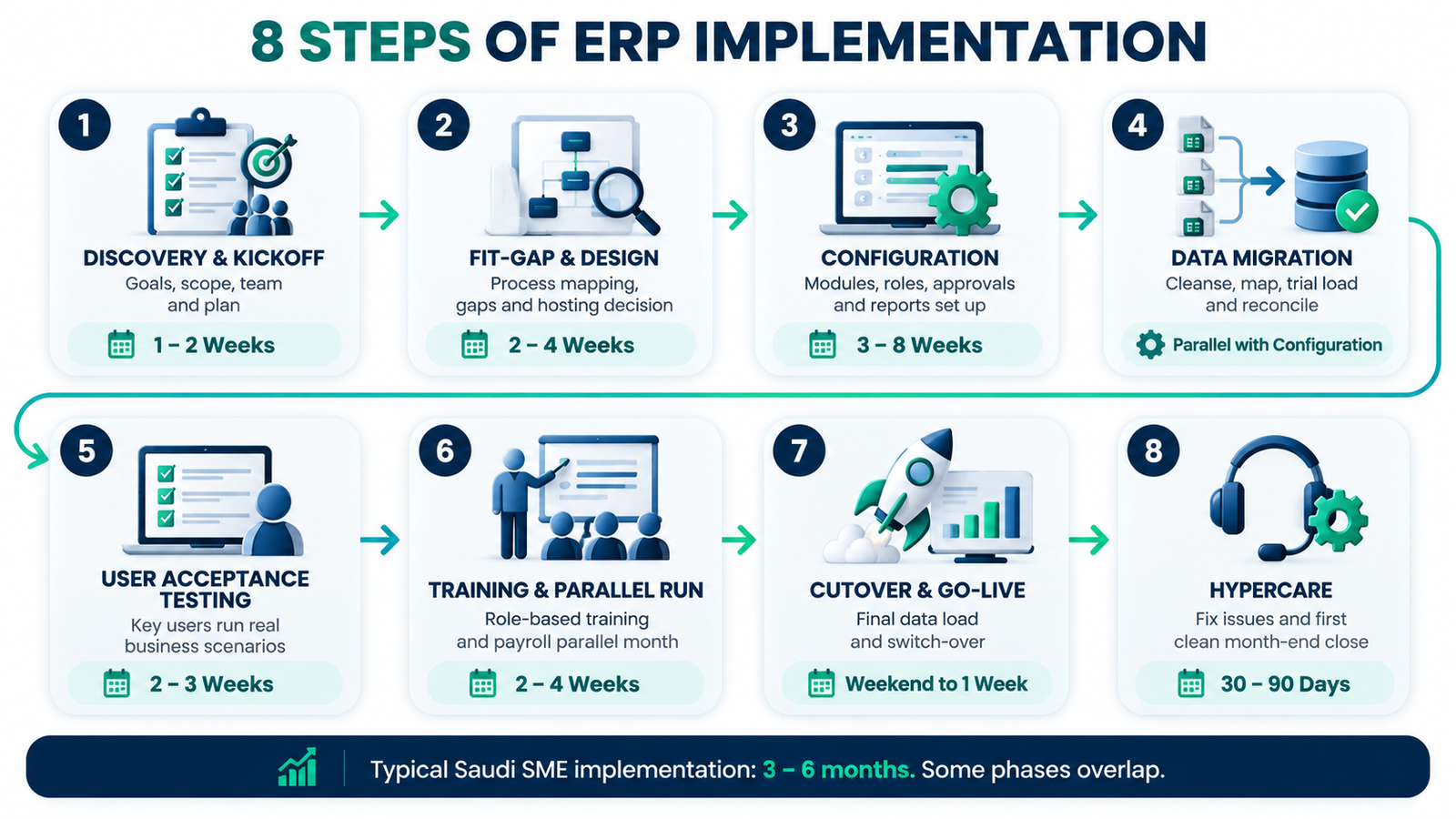
The ERP implementation process has 8 steps: discovery, fit-gap and design, configuration, data migration, testing, training, go-live and hypercare. For most Saudi SMEs, that takes roughly 3 to 6 months. The steps are the same everywhere, but the details are not. If you are planning ERP implementation in Saudi Arabia, you also have to decide where your data will be hosted, get payroll right for GOSI and Mudad, and pick a go-live date that works around Ramadan and month-end close.
Most projects that run late do not fail on software. A study of Saudi organisations by researchers at King Fahd University of Petroleum and Minerals found that most suffered serious time or cost overruns, and that management commitment, change management and training decided success. This guide gives you each step with an owner, a typical duration and a clear output, so nothing falls between your team and your partner.
Still comparing systems? Start with how to choose the right ERP system in Saudi Arabia, then come back here once you have a shortlist.
The ERP implementation process at a glance
An ERP implementation moves through 8 phases in a fixed order, and each phase ends with a sign-off before the next one starts. Use this table as your project map. Durations are typical for a single-company Saudi SME; budget each phase using our breakdown of ERP implementation cost in Saudi Arabia.
|
Step |
What happens |
Owner |
Typical duration |
Output |
|---|---|---|---|---|
|
1. Discovery and kickoff |
Goals, scope, team, plan |
You + partner |
1 to 2 weeks |
Signed project charter |
|
2. Fit-gap and design |
Process mapping, gaps, hosting decision |
Partner, with your key users |
2 to 4 weeks |
Solution design document |
|
3. Configuration |
Modules, roles, approvals, reports set up |
Partner |
3 to 8 weeks |
Configured test system |
|
4. Data migration |
Cleanse, map, trial load, reconcile |
You (data) + partner (tools) |
Runs alongside step 3 |
Reconciled trial load |
|
5. Testing (UAT) |
Key users run real business scenarios |
Your key users |
2 to 3 weeks |
UAT sign-off |
|
6. Training and parallel run |
Role-based training, payroll parallel month |
Partner trains, you attend |
2 to 4 weeks |
Trained users, matched payroll |
|
7. Cutover and go-live |
Final data load, switch-over |
Both |
1 weekend to 1 week |
Live system |
|
8. Hypercare |
Fix issues, first clean month-end close |
Partner support, your key users |
30 to 90 days |
Stable system, old system retired |
Step 1: Discovery and project kickoff
Discovery is the first ERP implementation step, where you and your partner agree on goals, scope and the team. It usually takes 1 to 2 weeks and ends with a signed project charter that lists modules, branches, users, deadlines and who approves what. Skipping it is the fastest way to blow your timeline.
Good discovery answers four questions in writing:
- What must the ERP fix? Pick 3 to 5 measurable goals, for example "close the month in 5 working days instead of 12".
- What is in scope? Which modules (finance, inventory, sales, purchasing, HR) and which branches go live first.
- Who decides? One internal project owner with real authority, usually the CFO or operations head.
- What is the deadline, and why? A real business reason (new financial year, a new branch opening) beats an arbitrary date.
Who should be on your project team
Your partner cannot configure an ERP around processes nobody explains to them. Plan for these roles from your side:
|
Role |
Who it usually is |
Time commitment |
|---|---|---|
|
Project sponsor |
Owner or GM |
1 to 2 hours a week, plus sign-offs |
|
Project owner |
CFO or operations head |
30 to 50% of their week |
|
Key users |
One per department and per branch |
4 to 8 hours a week, more during testing |
|
IT contact |
In-house IT or an outsourced provider |
As needed for access, devices, integrations |
Team time is the hidden cost most companies forget when budgeting your ERP project. A key user who is also running a busy branch in Riyadh or Dammam will always choose the branch.
Step 2: Requirements, fit-gap and solution design
Fit-gap analysis compares how your business works today with how the ERP works out of the box. Each gap gets one of three answers: change the process, configure the system, or customise it. This step takes 2 to 4 weeks and produces a solution design document that becomes the build plan.
What to cover in the workshops:
- Order to cash: quotes, sales orders, delivery, invoicing, collections
- Procure to pay: requests, approvals, purchase orders, receiving, supplier payments
- Inventory: warehouses, branches, stock transfers, units of measure
- Finance: chart of accounts, cost centres, bank reconciliation, month-end close
- HR and payroll, if in scope
Design your chart of accounts and cost centres once, for every branch and entity. Changing them after go-live means re-mapping history and retraining everyone who reads a report. If the fit-gap shows the software is a poor match, stop and review your options before configuration starts. A good partner will tell you; this is also where choosing an implementation partner with real local experience pays off.
Decide where your ERP data will live
Saudi businesses need to decide early whether ERP data is hosted inside the Kingdom or abroad. Saudi Arabia's Personal Data Protection Law (PDPL) has been fully enforced since 14 September 2024, and it covers employee and customer personal data held in your ERP.
The PDPL does not ban overseas hosting outright. It regulates transfers, and data can leave the Kingdom through approved routes such as standard contractual clauses, with a risk assessment in some cases. Clyde & Co's summary of SDAIA's transfer rules explains the mechanics. Two practical points matter during implementation:
- Remote access counts. A support team logging in from outside Saudi Arabia to see personal data is treated as a transfer.
- Ask your vendor in writing: which cloud region hosts our data, where are backups stored, and from which countries can support staff access it?
This is not legal advice. If you hold sensitive data or work in a regulated sector such as finance or healthcare, check the decision with a Saudi-licensed lawyer before you sign the hosting contract.
Step 3: Configuration and build
Configuration is where your partner sets up the ERP to match the solution design: company structure, branches, warehouses, user roles, approval limits, document templates and reports. It is the longest single step, usually 3 to 8 weeks, and it ends with a working test system your key users can log into.
Ask for short demos every one or two weeks instead of one big reveal at the end. Your key users will spot a wrong approval flow in 10 minutes. Finding it during testing costs days.
Keep customisation on a leash
Every customisation adds build time, testing time and upgrade risk. Before you approve one, ask three questions:
- Can we change our process instead?
- Who owns this customisation after go-live, and who pays to maintain it?
- What does it cost us, in riyals or hours, if we do not build it?
If nobody can answer the third question, it is a nice-to-have. Park it for phase 2.
Step 4: Data migration
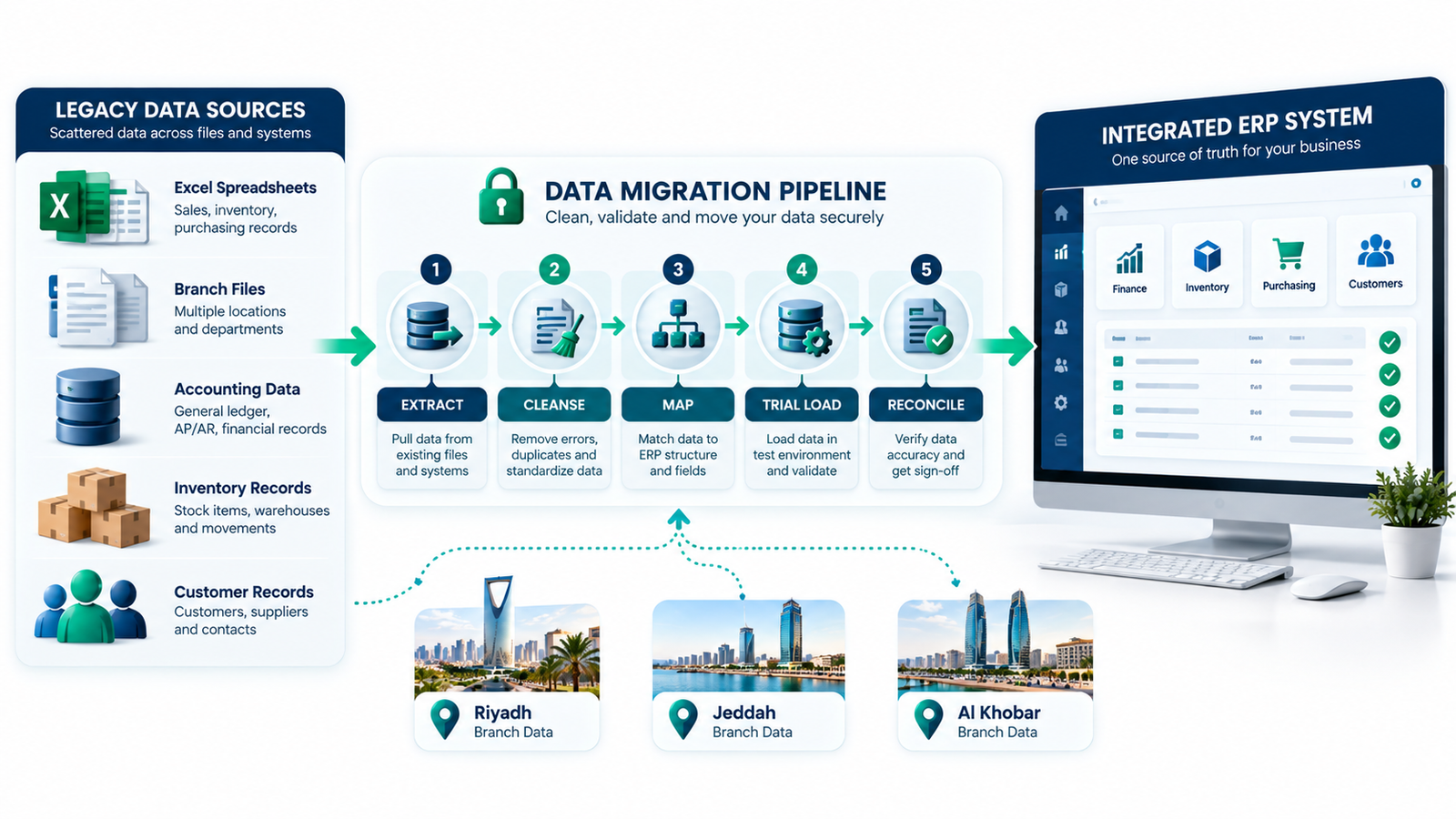
ERP data migration moves your master data, opening balances and open transactions from old systems into the new ERP. It runs alongside configuration, and your team owns the data while the partner owns the tools. Plan at least two trial loads before the final one. Dirty data is the most common reason go-live dates slip.
What to migrate and what to leave behind
Not everything needs to move. Full transaction history is slow, expensive and rarely worth it.
|
Data |
Migrate? |
Notes |
|---|---|---|
|
Chart of accounts and cost centres |
Yes |
Use the new structure from Step 2, mapped to old codes |
|
Customers and suppliers |
Yes |
Active records only; merge duplicates first |
|
Items and price lists |
Yes |
Check units of measure and item codes per branch |
|
Opening balances (GL, stock, AR, AP) |
Yes |
Signed off by finance as at the cutover date |
|
Open orders and unpaid invoices |
Yes |
Only what is still open on cutover day |
|
Employee master data |
Yes, if HR is in scope |
Include IBANs, ID numbers, contract and salary details |
|
Fixed assets register |
Yes |
Cost, accumulated depreciation, remaining life |
|
Closed transaction history |
Usually no |
Keep the old system read-only, or migrate monthly totals for reporting |
ERP data migration steps
- Extract data from every source: old software, Excel sheets, branch files.
- Cleanse: remove duplicates, close inactive records, fix missing fields.
- Standardise: one format for names, phone numbers, addresses and item codes.
- Map old fields to new fields in a migration template.
- Trial load into the test system.
- Reconcile: trial balance, stock quantities and customer balances must match the old system.
- Repeat the trial load until reconciliation is clean.
- Final load during cutover (Step 7).
Start cleansing in week one, not week eight. A trading company with 15,000 item codes across Al Khobar, Riyadh and Jeddah warehouses will not clean them in a weekend.
Step 5: Testing and user acceptance (UAT)
User acceptance testing (UAT) is where your own key users run real business scenarios in the test system and confirm it works. Your partner tests the configuration first, but only your people know whether the output is right. UAT usually takes 2 to 3 weeks and ends with a written sign-off from each department.
Write test scripts from real documents, not imagined ones. Pull last month's actual orders, invoices and payments, then rerun them in the new ERP and compare.
Sample UAT scenarios for a Saudi trading company
|
Scenario |
What the key user checks |
|---|---|
|
Order to cash |
Quote to sales order to delivery note to invoice to payment receipt, with correct prices and discounts |
|
Procure to pay |
Purchase request, approval by the right person at the right limit, PO, goods receipt, supplier payment |
|
Inter-branch transfer |
Stock leaves the Dammam warehouse and arrives in Riyadh with matching quantities and cost |
|
Month-end close |
Bank reconciliation, accruals, depreciation run, trial balance that matches expectations |
|
User permissions |
A branch user cannot see another branch's margins or approve above their limit |
Log every issue with a severity. Go-live waits for critical issues only. Cosmetic fixes can go into the hypercare list.
Step 6: Training and parallel run
Training turns a configured system into one your staff actually use. Plan role-based sessions, not one long demo for everyone, and train your key users first so they can support their own teams. This step takes 2 to 4 weeks and, for payroll, should include one full parallel month where old and new systems run side by side.
What works well in practice:
- Train-the-trainer: key users learn first, then teach their departments in the local context.
- Short task guides: one page per task, such as "how to raise a purchase request".
- Recorded screen videos in the language each team works in.
- A sandbox where staff can practise without touching real data.
Users who are trained more than three weeks before go-live forget most of it. Schedule end-user training for the final two weeks before cutover.
Payroll go-live checklist for Saudi companies
If HR and payroll are in scope, payroll is the module that hurts most when it goes wrong, because salaries are late and compliance flags follow. Many ERPs need a Saudi localisation add-on to handle GOSI and Mudad properly, so confirm this during fit-gap. Before payroll goes live, tick off each item:
- GOSI contributions split correctly for Saudi and non-Saudi employees
- Salary components (basic, housing, transport, allowances) mapped to match GOSI-registered wages
- Wage Protection System (WPS) file generated in the format Mudad accepts, tested with a sample upload
- Every employee IBAN validated against the bank format
- End-of-service benefit calculation checked against a few real employee cases
- Leave balances and loans migrated and reconciled
- One full parallel payroll month where old and new systems produce the same net pay
Step 7: Cutover and ERP go-live
Cutover is the planned switch from the old system to the new ERP. Transactions in the old system freeze, final balances are loaded and reconciled, and users start working in the new system. For a single-company SME, cutover usually fits into one weekend or a few days, but it only works if the go/no-go checks below are clean.
A simple cutover plan, hour by hour, covers:
- Freeze date and time for new transactions in the old system.
- Final stock count in every warehouse and branch.
- Final data load of balances and open transactions.
- Reconciliation sign-off by finance.
- User access switched on, old system set to read-only.
- Day-one support rota with named people at each branch.
Picking your go-live date in Saudi Arabia
The best ERP go-live date in Saudi Arabia is the start of a quiet month, outside Ramadan and peak season, with enough time before year-end close. Avoid these windows:
- Month-end and year-end close. Finance cannot close the books and learn a new system in the same week.
- Ramadan. Working hours are shorter for Muslim employees, and teams have less capacity for training and fixes.
- Eid holidays. Offices close and support coverage gets thin.
- Your own peak season. For retailers that may be back-to-school or the run-up to Eid; for contractors, a major project handover.
Going live at the start of a month gives you one clean month of data in the new system and a natural checkpoint at the first month-end close.
ERP go-live checklist (go/no-go)
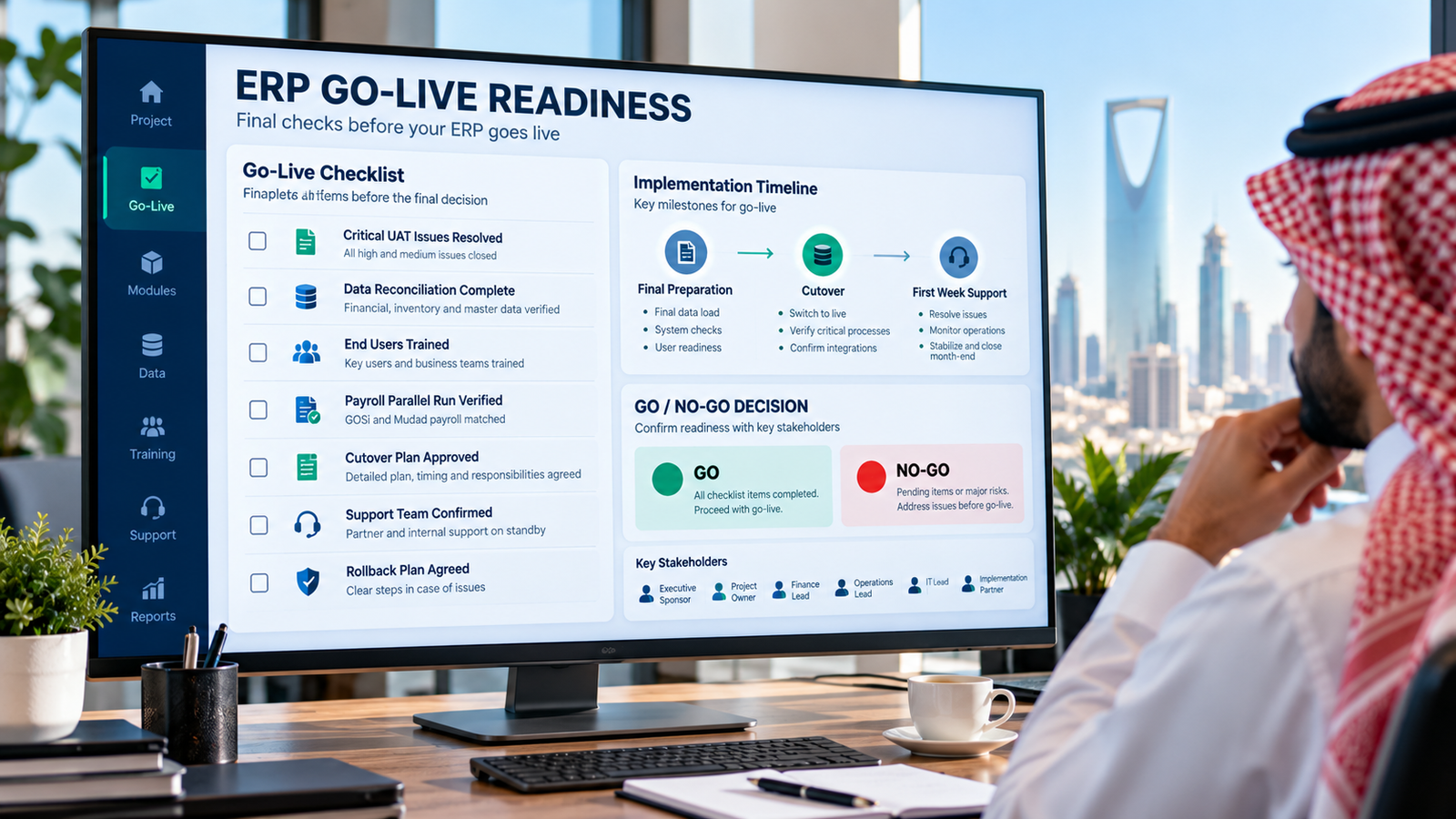
Hold a go/no-go meeting two to three days before cutover. Go live only if every item is ticked:
- No open critical issues from UAT
- Final trial load reconciled to the old system
- All end users trained and logged in at least once
- Payroll parallel run matched, if payroll is in scope
- Cutover plan signed by your project owner and the partner
- Day-one and week-one support rota confirmed
- Rollback plan agreed: what happens if go-live has to stop
Step 8: Hypercare and optimisation
Hypercare is the support period right after go-live, usually 30 to 90 days, when your partner responds faster and stays close to users while problems are small. It ends when you complete one clean month-end close in the new ERP and can retire the old system for good.
|
Period |
Focus |
|---|---|
|
Week 1 |
Daily issue log, key users on the floor at each branch, quick fixes |
|
Days 8 to 30 |
First month-end close in the new ERP, report fixes, permission tweaks |
|
Days 31 to 90 |
Old system switched to read-only archive, phase-2 backlog agreed, usage reviewed |
Keep the phase-2 list visible. Every "nice to have" parked during Step 3 lands here, and it is easier to prioritise once people use the system daily. Ask your partner what ERP go-live support includes before you sign, not after.
How long does ERP implementation take?
ERP implementation in Saudi Arabia typically takes 2 to 4 months for a small single-company business, 4 to 8 months for a multi-branch company, and 8 to 12 months or more for multi-entity or manufacturing groups. Scope, data quality and how fast your team makes decisions matter more than the software you chose.
|
Company profile |
Users |
Typical modules |
Typical timeline |
Biggest time driver |
|---|---|---|---|---|
|
Small, single company, one location |
Under 25 |
Finance, sales, purchasing, inventory |
2 to 4 months |
Data cleanup |
|
Mid-size, several branches |
25 to 100 |
Above plus HR/payroll, branch transfers |
4 to 8 months |
Agreeing one process across branches |
|
Multi-entity or manufacturing |
100+ |
Above plus production, intercompany, consolidation |
8 to 12+ months |
Integrations and customisation |
Treat these ranges as a starting point. Your partner's estimate after discovery is the number to plan around. Three things stretch an ERP implementation timeline more than anything else: decisions that wait for weeks, data that was never cleaned, and scope that keeps growing after design sign-off.
Phased roll-out vs big-bang go-live
A phased roll-out takes the ERP live in one branch or module first, then expands. A big-bang go-live switches every branch and module on the same day. For most multi-branch Saudi companies, a phased roll-out is safer, while small single-location businesses can usually go big-bang.
|
Phased roll-out |
Big-bang go-live |
|
|---|---|---|
|
Best for |
Multi-branch or multi-entity companies |
Single location, simple operations |
|
Risk |
Lower: problems stay in one branch |
Higher: one issue hits everyone |
|
Timeline |
Longer overall |
Shorter overall |
|
Watch out for |
Running two systems side by side for a while |
No fallback if cutover goes wrong |
|
Example |
Pilot in the Al Khobar head office, then Riyadh, then Jeddah |
A single Riyadh showroom with one warehouse |
If you run several stores, our guide on multi-branch ERP for retail covers stock sync and branch transfers in more detail.
7 mistakes that derail ERP projects in Saudi Arabia
Most ERP projects that fail in Saudi Arabia fail on people and planning, not technology. The KFUPM research cited above points the same way: weak management commitment and too little change management and training are what push projects over time and budget. Watch for these seven:
- No real project owner. Fix: give one senior person the authority to decide, and the time to do it.
- Key users too busy to test. Fix: free up their time on paper before the project starts.
- Cleaning data at the last minute. Fix: start cleansing in week one, alongside discovery.
- Customising everything. Fix: change the process first; customise only what has a clear payback.
- Leaving the hosting decision to the end. Fix: settle in-Kingdom vs overseas hosting during fit-gap.
- Going live during Ramadan or year-end close. Fix: pick a quiet month-start date in Step 1.
- Cutting training to save money. Fix: budget training and change management as a fixed line, not a leftover.
How Intellitech runs your ERP implementation
Intellitech Solutions is an ERP implementation partner based in Al Khobar, working with businesses across the Eastern Province, Riyadh and Jeddah. We run projects through the same 8 steps in this guide, with one named owner on our side, written sign-offs at every phase and hypercare after go-live.
If you want a realistic plan before you commit, see how we deliver end-to-end ERP implementation, or book a scoping call and we will map your modules, branches and timeline in one session.
Frequently asked questions
How long does ERP implementation take for a small business in Saudi Arabia?
A small Saudi business with one location and under 25 users can usually complete ERP implementation in 2 to 4 months. The biggest variables are how clean your data is, how many modules go live at once, and how quickly your team signs off each phase.
What are the main phases of ERP implementation?
ERP implementation has 8 main phases: discovery, fit-gap and design, configuration, data migration, testing, training, cutover and hypercare. Each phase ends with a sign-off before the next starts. Data migration usually runs alongside configuration to save time.
What data should we migrate to the new ERP?
Migrate master data, opening balances and open transactions; leave most closed history in the old system. That means customers, suppliers, items, chart of accounts, balances as at cutover, and unpaid invoices or open orders. Keep the old system read-only for audits and look-ups.
Can our ERP data be hosted outside Saudi Arabia?
Yes, in many cases, but transfers of personal data outside Saudi Arabia must follow the PDPL's approved transfer routes. Remote support access from abroad also counts as a transfer. Ask your vendor where data and backups are stored, and get legal advice for sensitive or regulated data.
Should we go live in all branches at once or one at a time?
Most multi-branch Saudi companies should go live one branch at a time, starting with a pilot. A phased roll-out keeps problems contained and lets you fix them before other branches switch. Single-location businesses with simple operations can usually go live all at once.
What happens after ERP go-live?
After ERP go-live comes hypercare, a 30 to 90 day support period with faster fixes and close user support. During it you complete the first month-end close in the new system, retire the old system, and agree the list of phase-2 improvements.